
SunucuPARK Blog
Ne Aramıştınız ?
Cpanel
Nasıl Kullanılır? Neler Yapılır?
Directadmin
Sade ve Güçlü Panel Directadmin hakkında merak ettikleriniz.
Linux - Centos
Komutlar, Yardım Makaleleri ve Scriptler
Ne Aramıştınız ?
Nasıl Kullanılır? Neler Yapılır?
Sade ve Güçlü Panel Directadmin hakkında merak ettikleriniz.
Komutlar, Yardım Makaleleri ve Scriptler
14-03-2023 Hits:3850 genel SunucuPARK Hosting Destek
Detay oku13-03-2023 Hits:5097 genel SunucuPARK Hosting Destek
Detay oku15-11-2022 Hits:4143 genel SunucuPARK Hosting Destek
Detay oku05-11-2022 Hits:5473 genel SunucuPARK Hosting Destek
Detay oku29-10-2022 Hits:3569 genel SunucuPARK Hosting Destek
Detay oku15-10-2022 Hits:2870 genel SunucuPARK Hosting Destek
Detay oku10-09-2022 Hits:3753 genel SunucuPARK Hosting Destek
Detay oku26-08-2022 Hits:3258 genel SunucuPARK Hosting Destek
Detay oku23-07-2022 Hits:3178 genel SunucuPARK Hosting Destek
Detay oku14-07-2022 Hits:4215 genel SunucuPARK Hosting Destek
Detay oku13-07-2022 Hits:4072 genel SunucuPARK Hosting Destek
Detay oku08-07-2022 Hits:3143 genel SunucuPARK Hosting Destek
Detay oku20-06-2022 Hits:3495 genel SunucuPARK Hosting Destek
Detay oku18-06-2022 Hits:4066 genel SunucuPARK Hosting Destek
Detay oku17-06-2022 Hits:4962 genel SunucuPARK Hosting Destek
Detay oku09-06-2022 Hits:4457 genel SunucuPARK Hosting Destek
Detay oku09-06-2022 Hits:3163 genel SunucuPARK Hosting Destek
Detay oku21-04-2022 Hits:4420 genel SunucuPARK Hosting Destek
Detay oku13-04-2022 Hits:3330 genel SunucuPARK Hosting Destek
Detay oku09-04-2022 Hits:3613 genel SunucuPARK Hosting Destek
Detay oku06-04-2022 Hits:4051 genel SunucuPARK Hosting Destek
Detay oku30-03-2022 Hits:3382 genel SunucuPARK Hosting Destek
Detay oku28-03-2022 Hits:3645 genel SunucuPARK Hosting Destek
Detay oku25-03-2022 Hits:5341 genel SunucuPARK Hosting Destek
Detay oku24-03-2022 Hits:5240 genel SunucuPARK Hosting Destek
Detay oku22-03-2022 Hits:4951 genel SunucuPARK Hosting Destek
Detay oku21-03-2022 Hits:4387 genel SunucuPARK Hosting Destek
Detay oku22-01-2022 Hits:3688 genel SunucuPARK
cat index.html | sed '//d' | sed '//d' > index.html Faydalı Olması Dileği İle SunucuPARK Destek
Detay oku18-01-2022 Hits:4667 genel SunucuPARK Hosting Destek
Detay oku17-01-2022 Hits:3849 genel SunucuPARK Hosting Destek
Detay oku07-01-2022 Hits:4339 genel SunucuPARK Hosting Destek
Detay oku05-01-2022 Hits:3816 genel SunucuPARK Hosting Destek
Detay oku04-01-2022 Hits:4885 genel SunucuPARK Hosting Destek
Detay oku29-12-2021 Hits:5029 genel SunucuPARK Hosting Destek
Detay oku23-12-2021 Hits:6381 genel SunucuPARK Hosting Destek
Detay oku26-11-2021 Hits:4129 genel SunucuPARK Hosting Destek
Detay oku23-10-2021 Hits:6035 genel SunucuPARK Hosting Destek
Detay oku06-10-2021 Hits:5908 genel SunucuPARK Hosting Destek
Detay oku02-10-2021 Hits:4522 genel SunucuPARK Hosting Destek
Detay oku01-10-2021 Hits:5386 genel SunucuPARK Hosting Destek
Detay oku30-09-2021 Hits:4193 genel SunucuPARK Hosting Destek
Detay oku29-09-2021 Hits:5885 genel SunucuPARK Hosting Destek
Detay oku27-09-2021 Hits:5161 genel SunucuPARK Hosting Destek
Detay oku25-09-2021 Hits:4568 genel SunucuPARK Hosting Destek
Detay oku24-09-2021 Hits:4437 genel SunucuPARK Hosting Destek
Detay oku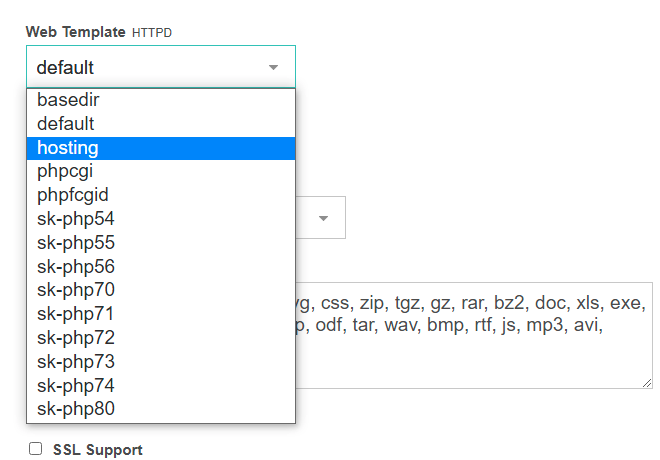
Öncelikle vestacp kurduğumuz sunucumuza ssh ile bağlanıyoruz. Ardından "cd /tmp" komutu ile tmp dizinine gidiyoruz. wget https://raw.githubusercontent.com/Skamasle/sk-php-selector/master/sk-php-selector2.sh Komutu ile php kurulumu için gerekli script dosyamızı indiriyoruz. Bundan sonra isterseniz bash sk-php-selector2.sh all komutunu kullanarak tüm…
Bu makalemizde sizlere Directadmin panelinde birden fazla PHP seçeneğini nasıl aktifleştirebileceğinizi göstereceğiz. Sunucunuza SSH ile bağlantı sağlayınız. Aşağıdaki komutları sırası ile giriniz. cd /usr/local/directadmin/custombuild ./build update ./build set php1_release 7.2 ./build set php1_mode mod_php php1_release ve php1_mode…
Linux sunucularda journalctl -xe ile anlık sunucudaki durumu kontrol ederken ya da bind servisine status komutu ile bakıldığında domain.com gibi sürekli bir sorgu yapılıyorsa sunucudan DDos çıkışı yapılıyor demektir. Anlık durum…
Centos 7 sunucunuzda Acronis Cyber Protection Agent kurulumu sırasında sistem kernel-devel-3.10.0-1127.el7.x86_64 yükleyemediği için devam edemeyip "kernel-devel-3.10.0-1127.el7.x86_64" yüklenemiyor manuel yükleyin hatası alıyorsanız aşağıdaki komutu çalıştırmanız yeterli olacaktır. yum install -y kernel-devel-`uname -r` --enablerepo=C*-base…
Bu makalemizde Linux sunucunuzun public IP adresini nasıl öğrenebileceğinizi göstereceğiz. Sunucunuza SSH ile bağlantı sağlayınız. Sonrasında aşağıdaki komutu çalıştırınız. curl ifconfig.co Ekran görüntüüsnde IP adresinizi görebilirsiniz. Faydalı Olması Dileği İle SunucuPARK Destek
VestaCP kurulum hatası: package: php-pecl-mcrypt-1.0.3-1.el7.. çözümü VestaCP kurulum sırasında aşağıdaki hatayla karşılaşıyor olabilirsiniz. Error: Package: php-pecl-mcrypt-1.0.3-1.el7.remi.7.4.x86_64 (remi-modular) .... You could try using --skip-broken to work around the problem You could try running: rpm -Va…
Centos 7 işletim sisteminde yum update komutu çalıştırıldığında "Failed to set locale, defaulting to C hatası alıyorsanız locale ayarlarında dil seçicisi hatalıdır bunu düzeltmek için aşağıdaki komutları çalıştırmanız yeterlidir. cat <…
Bu makalemizde sizlere Directadmin'de mail kuyruğunu nasıl sileceğinizi anlatacağız. Öncelikle sunucunuza SSH ile bağlantı sağlayınız. exim -bp | awk '/^ *[0-9]+[mhd]/{print "exim -Mrm " $3}' | sh Sonrasında yukarıdaki komutu çalıştırınız. Tüm mail kuyruğu…

PostgreSQL varsayılan portunu ssh üezerinden değiştirebilirsiniz. Bunun için öncelikle postgresql.conf dosyasının yerini bulmamız gerekiyor. Bunun için; locate postgresql.conf Komutunu çalıştırdığınızda aşağıdaki çıktıdaki gibi size dosya yolunu gösterecektir. Dosya yolunu bulduktan sonra istediğiniz bir…