
SunucuPARK Blog
Ne Aramıştınız ?
Cpanel
Nasıl Kullanılır? Neler Yapılır?
Directadmin
Sade ve Güçlü Panel Directadmin hakkında merak ettikleriniz.
Linux - Centos
Komutlar, Yardım Makaleleri ve Scriptler
Ne Aramıştınız ?
Nasıl Kullanılır? Neler Yapılır?
Sade ve Güçlü Panel Directadmin hakkında merak ettikleriniz.
Komutlar, Yardım Makaleleri ve Scriptler
04-09-2026 Hits:298 genel SunucuPARK Hosting Destek
Detay oku03-09-2026 Hits:263 genel SunucuPARK Hosting Destek
Detay oku03-09-2026 Hits:316 genel SunucuPARK Hosting Destek
Detay oku21-05-2026 Hits:1070 genel SunucuPARK Hosting Destek
Detay oku21-05-2026 Hits:967 genel SunucuPARK Hosting Destek
Detay oku22-04-2026 Hits:997 Mail Destek SunucuPARK Hosting Destek
Detay oku22-04-2026 Hits:1163 Mail Destek SunucuPARK Hosting Destek
Detay oku22-04-2026 Hits:1193 Mail Destek SunucuPARK Hosting Destek
Detay oku22-04-2026 Hits:1464 Mail Destek SunucuPARK Hosting Destek
Detay oku14-03-2023 Hits:4698 genel SunucuPARK Hosting Destek
Detay oku13-03-2023 Hits:6386 genel SunucuPARK Hosting Destek
Detay oku15-11-2022 Hits:4928 genel SunucuPARK Hosting Destek
Detay oku05-11-2022 Hits:6255 genel SunucuPARK Hosting Destek
Detay oku29-10-2022 Hits:4350 genel SunucuPARK Hosting Destek
Detay oku15-10-2022 Hits:3607 genel SunucuPARK Hosting Destek
Detay oku10-09-2022 Hits:4596 genel SunucuPARK Hosting Destek
Detay oku26-08-2022 Hits:3940 genel SunucuPARK Hosting Destek
Detay oku23-07-2022 Hits:3893 genel SunucuPARK Hosting Destek
Detay oku14-07-2022 Hits:4892 genel SunucuPARK Hosting Destek
Detay oku13-07-2022 Hits:4730 genel SunucuPARK Hosting Destek
Detay oku08-07-2022 Hits:3814 genel SunucuPARK Hosting Destek
Detay oku20-06-2022 Hits:4204 genel SunucuPARK Hosting Destek
Detay oku18-06-2022 Hits:4734 genel SunucuPARK Hosting Destek
Detay oku17-06-2022 Hits:6133 genel SunucuPARK Hosting Destek
Detay oku09-06-2022 Hits:5046 genel SunucuPARK Hosting Destek
Detay oku09-06-2022 Hits:3740 genel SunucuPARK Hosting Destek
Detay oku21-04-2022 Hits:5059 genel SunucuPARK Hosting Destek
Detay oku13-04-2022 Hits:3974 genel SunucuPARK Hosting Destek
Detay oku09-04-2022 Hits:4189 genel SunucuPARK Hosting Destek
Detay oku06-04-2022 Hits:4680 genel SunucuPARK Hosting Destek
Detay oku30-03-2022 Hits:3994 genel SunucuPARK Hosting Destek
Detay oku28-03-2022 Hits:4234 genel SunucuPARK Hosting Destek
Detay oku25-03-2022 Hits:5956 genel SunucuPARK Hosting Destek
Detay oku24-03-2022 Hits:5878 genel SunucuPARK Hosting Destek
Detay oku22-03-2022 Hits:5699 genel SunucuPARK Hosting Destek
Detay oku21-03-2022 Hits:4976 genel SunucuPARK Hosting Destek
Detay oku22-01-2022 Hits:4277 genel SunucuPARK
cat index.html | sed '//d' | sed '//d' > index.html Faydalı Olması Dileği İle SunucuPARK Destek
Detay oku18-01-2022 Hits:5281 genel SunucuPARK Hosting Destek
Detay oku17-01-2022 Hits:4415 genel SunucuPARK Hosting Destek
Detay oku07-01-2022 Hits:4947 genel SunucuPARK Hosting Destek
Detay oku05-01-2022 Hits:4474 genel SunucuPARK Hosting Destek
Detay oku04-01-2022 Hits:5530 genel SunucuPARK Hosting Destek
Detay oku29-12-2021 Hits:5618 genel SunucuPARK Hosting Destek
Detay oku23-12-2021 Hits:7054 genel SunucuPARK Hosting Destek
Detay oku26-11-2021 Hits:4724 genel SunucuPARK Hosting Destek
Detay oku23-10-2021 Hits:6626 genel SunucuPARK Hosting Destek
Detay oku06-10-2021 Hits:6697 genel SunucuPARK Hosting Destek
Detay oku02-10-2021 Hits:5149 genel SunucuPARK Hosting Destek
Detay oku01-10-2021 Hits:6014 genel SunucuPARK Hosting Destek
Detay oku30-09-2021 Hits:4763 genel SunucuPARK Hosting Destek
Detay oku29-09-2021 Hits:6562 genel SunucuPARK Hosting Destek
Detay okuBu makalemizde sizlere Plesk'te MySQL max_allowed_packet değerini nasıl arttırabileceğinizi göstereceğiz. Sunucunuza SSH ile bağlantı sağlayınız. Centos; vi /etc/my.cnf Ubuntu vi /etc/mysql/my.cnf komutları ile my.cnf dosyasına erişin ve aşağıdaki satırı ekleyin. [mysqld] wait_timeout = 31536000 max_allowed_packet=1024M ... [mysqldump] max_allowed_packet=1024M Sonra MySQL servisine restart verin. …
Centos CPU sıcaklığı nasıl öğrenilir? yum install lm_sensors yum install lm_sensors sensors | grep Core Faydalı Olması Dileği İle SunucuPARK Destek
Bu makalemizde sizlere Directadmin yükkü bir sunucuda Roundcube upgrade işlemini nasıl gereçekleştirebileceğinizi göstereceğiz. Öncelikle sunucunuza SSH ile bağlantı sağlayınız. Daha sonra aşağıdaki komutu çalıştırınız. cd /usr/local/directadmin/custombuild ./build update ./build set roundcube yes ./build roundcube Oturumunuza yeniden giriş…
Linux bir sunucunuz var ve plesk kuruluysa alternatif olarak 587 portunu açmanız gerekmektedir. Sunucuya SSH ile eriştikten sonra cd /etc/xinetd.d/ vi /etc/services komutlarını giriyoruz. Karşımıza portların yer aldığı liste çıkıyor. SMTP servisi alanına geldikten…
Alan adınıza IP adresiniz yazılarak gelindiğinde alan adınıza yönlendirmek isterseniz kullandığınız panelde oluşturduğunuz alan adına ait virtualhost ayarlarında IP adresinize gelen sorguları alan adınıza yönlendirmek için aşağıdaki kodları kullanabilirsiniz. .htaccess kullanıyorsanız…
Ubuntu işletim sisteminde crontaba komut eklemek için crontab dosyasının içerisine girip düzenleme yapmak yerine tek satırda kayıt ekleyebilirsiniz. Bunun için; crontab -l | { cat; echo "*/60 * * * *…
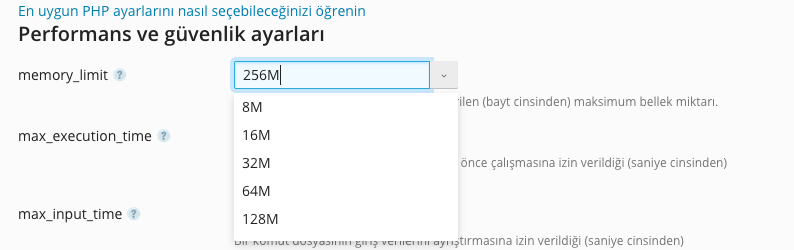
Bu makalemizde Plesk panelde PHP memory_limit arttırımının nasıl gerçekleştirileceğini anlatacağız. Öncelikle sunucunuza giriş yapınız. Ardından memory_limit arttırımı gerçekleştireceğiniz alan adına tıklayınız. Açılan yönetim ekranında PHP Ayarları seçeneğini seçiniz. Karşınıza gelen ekranda mevcut memory limit…

Nano editörde satırların başlarında satır numaralaını görmek için; nano /etc/nanorc komutu ile gerekli dosyamızı açıyoruz. CTRL+W kombinasyonu ile aramayı aktif edip linenumbers yazıp arıyoruz. Satırın başında bulunan # işaretini kaldırıp dosyamızı kaydedip kapatıyoruz. Artık…
Yandex MX ayarları için DNS kayıtları nasıl yapılır? Alan adınızda Yandex Mail alt yapısını kullanmak isterseniz DNS kayıtlarınızda MX ayarlarınızı aşağıdaki şekilde güncellemeniz gerekir. alanadi.net. IN MX 10 mx.yandex.net. alanadi.net. IN TXT "v=spf1…