
SunucuPARK Blog
Ne Aramıştınız ?
Cpanel
Nasıl Kullanılır? Neler Yapılır?
Directadmin
Sade ve Güçlü Panel Directadmin hakkında merak ettikleriniz.
Linux - Centos
Komutlar, Yardım Makaleleri ve Scriptler
Ne Aramıştınız ?
Nasıl Kullanılır? Neler Yapılır?
Sade ve Güçlü Panel Directadmin hakkında merak ettikleriniz.
Komutlar, Yardım Makaleleri ve Scriptler
22-04-2026 Hits:195 Mail Destek SunucuPARK Hosting Destek
Detay oku22-04-2026 Hits:238 Mail Destek SunucuPARK Hosting Destek
Detay oku22-04-2026 Hits:183 Mail Destek SunucuPARK Hosting Destek
Detay oku14-03-2023 Hits:4145 genel SunucuPARK Hosting Destek
Detay oku13-03-2023 Hits:5471 genel SunucuPARK Hosting Destek
Detay oku15-11-2022 Hits:4376 genel SunucuPARK Hosting Destek
Detay oku05-11-2022 Hits:5705 genel SunucuPARK Hosting Destek
Detay oku29-10-2022 Hits:3784 genel SunucuPARK Hosting Destek
Detay oku15-10-2022 Hits:3100 genel SunucuPARK Hosting Destek
Detay oku10-09-2022 Hits:4015 genel SunucuPARK Hosting Destek
Detay oku26-08-2022 Hits:3462 genel SunucuPARK Hosting Destek
Detay oku23-07-2022 Hits:3404 genel SunucuPARK Hosting Destek
Detay oku13-07-2022 Hits:4285 genel SunucuPARK Hosting Destek
Detay oku08-07-2022 Hits:3352 genel SunucuPARK Hosting Destek
Detay oku20-06-2022 Hits:3721 genel SunucuPARK Hosting Destek
Detay oku18-06-2022 Hits:4297 genel SunucuPARK Hosting Destek
Detay oku17-06-2022 Hits:5177 genel SunucuPARK Hosting Destek
Detay oku09-06-2022 Hits:4658 genel SunucuPARK Hosting Destek
Detay oku09-06-2022 Hits:3361 genel SunucuPARK Hosting Destek
Detay oku21-04-2022 Hits:4619 genel SunucuPARK Hosting Destek
Detay oku13-04-2022 Hits:3534 genel SunucuPARK Hosting Destek
Detay oku09-04-2022 Hits:3825 genel SunucuPARK Hosting Destek
Detay oku06-04-2022 Hits:4259 genel SunucuPARK Hosting Destek
Detay oku30-03-2022 Hits:3584 genel SunucuPARK Hosting Destek
Detay oku28-03-2022 Hits:3843 genel SunucuPARK Hosting Destek
Detay oku25-03-2022 Hits:5570 genel SunucuPARK Hosting Destek
Detay oku24-03-2022 Hits:5452 genel SunucuPARK Hosting Destek
Detay oku22-03-2022 Hits:5196 genel SunucuPARK Hosting Destek
Detay oku21-03-2022 Hits:4574 genel SunucuPARK Hosting Destek
Detay oku22-01-2022 Hits:3901 genel SunucuPARK
cat index.html | sed '//d' | sed '//d' > index.html Faydalı Olması Dileği İle SunucuPARK Destek
Detay oku18-01-2022 Hits:4893 genel SunucuPARK Hosting Destek
Detay oku17-01-2022 Hits:4050 genel SunucuPARK Hosting Destek
Detay oku07-01-2022 Hits:4542 genel SunucuPARK Hosting Destek
Detay oku05-01-2022 Hits:4050 genel SunucuPARK Hosting Destek
Detay oku04-01-2022 Hits:5107 genel SunucuPARK Hosting Destek
Detay oku29-12-2021 Hits:5243 genel SunucuPARK Hosting Destek
Detay oku23-12-2021 Hits:6600 genel SunucuPARK Hosting Destek
Detay oku26-11-2021 Hits:4320 genel SunucuPARK Hosting Destek
Detay oku23-10-2021 Hits:6257 genel SunucuPARK Hosting Destek
Detay oku06-10-2021 Hits:6148 genel SunucuPARK Hosting Destek
Detay oku02-10-2021 Hits:4770 genel SunucuPARK Hosting Destek
Detay oku01-10-2021 Hits:5625 genel SunucuPARK Hosting Destek
Detay oku30-09-2021 Hits:4386 genel SunucuPARK Hosting Destek
Detay oku29-09-2021 Hits:6102 genel SunucuPARK Hosting Destek
Detay oku27-09-2021 Hits:5362 genel SunucuPARK Hosting Destek
Detay oku25-09-2021 Hits:4749 genel SunucuPARK Hosting Destek
Detay okuUbuntu işletim sisteminde crontaba komut eklemek için crontab dosyasının içerisine girip düzenleme yapmak yerine tek satırda kayıt ekleyebilirsiniz. Bunun için; crontab -l | { cat; echo "*/60 * * * *…
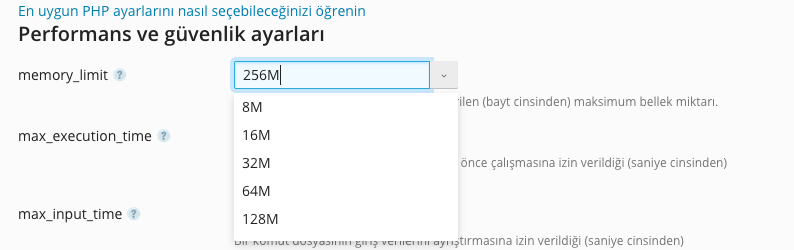
Bu makalemizde Plesk panelde PHP memory_limit arttırımının nasıl gerçekleştirileceğini anlatacağız. Öncelikle sunucunuza giriş yapınız. Ardından memory_limit arttırımı gerçekleştireceğiniz alan adına tıklayınız. Açılan yönetim ekranında PHP Ayarları seçeneğini seçiniz. Karşınıza gelen ekranda mevcut memory limit…

Nano editörde satırların başlarında satır numaralaını görmek için; nano /etc/nanorc komutu ile gerekli dosyamızı açıyoruz. CTRL+W kombinasyonu ile aramayı aktif edip linenumbers yazıp arıyoruz. Satırın başında bulunan # işaretini kaldırıp dosyamızı kaydedip kapatıyoruz. Artık…
Yandex MX ayarları için DNS kayıtları nasıl yapılır? Alan adınızda Yandex Mail alt yapısını kullanmak isterseniz DNS kayıtlarınızda MX ayarlarınızı aşağıdaki şekilde güncellemeniz gerekir. alanadi.net. IN MX 10 mx.yandex.net. alanadi.net. IN TXT "v=spf1…
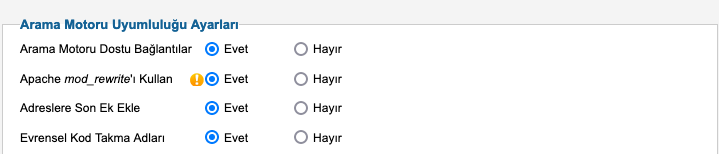
Eğer Joomle alt yapısına sahip bir siteniz bulunuyorsa sizi arama motorlarında öne çıkaracak birkaç öneride bulunabiliriz. Joomle SEO çalışması için en temel olarak web sayfalarınıza site içeriğine ve her bir…
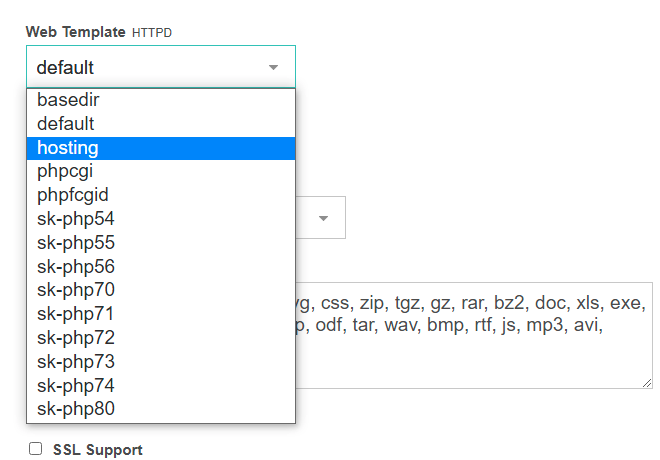
Öncelikle vestacp kurduğumuz sunucumuza ssh ile bağlanıyoruz. Ardından "cd /tmp" komutu ile tmp dizinine gidiyoruz. wget https://raw.githubusercontent.com/Skamasle/sk-php-selector/master/sk-php-selector2.sh Komutu ile php kurulumu için gerekli script dosyamızı indiriyoruz. Bundan sonra isterseniz bash sk-php-selector2.sh all komutunu kullanarak tüm…
Bu makalemizde sizlere Directadmin panelinde birden fazla PHP seçeneğini nasıl aktifleştirebileceğinizi göstereceğiz. Sunucunuza SSH ile bağlantı sağlayınız. Aşağıdaki komutları sırası ile giriniz. cd /usr/local/directadmin/custombuild ./build update ./build set php1_release 7.2 ./build set php1_mode mod_php php1_release ve php1_mode…
Linux sunucularda journalctl -xe ile anlık sunucudaki durumu kontrol ederken ya da bind servisine status komutu ile bakıldığında domain.com gibi sürekli bir sorgu yapılıyorsa sunucudan DDos çıkışı yapılıyor demektir. Anlık durum…
Centos 7 sunucunuzda Acronis Cyber Protection Agent kurulumu sırasında sistem kernel-devel-3.10.0-1127.el7.x86_64 yükleyemediği için devam edemeyip "kernel-devel-3.10.0-1127.el7.x86_64" yüklenemiyor manuel yükleyin hatası alıyorsanız aşağıdaki komutu çalıştırmanız yeterli olacaktır. yum install -y kernel-devel-`uname -r` --enablerepo=C*-base…